Migrating OneNote to Joplin

Getting your notes out of OneNote
Getting data out of OneNote is the part of this migration where Microsoft makes you work for it. Unlike OneDrive - where the desktop client will happily sync the entire tree to disk on demand - OneNote has no equivalent “export everything” command. The native export options are notebook-by-notebook, section-by-section, and the formats they offer (.one proprietary, .docx, .pdf, .mht) are either useless to Joplin or lossy on the way through. The route I took was OneNote desktop on Windows exporting to .one files, then Joplin’s native OneNote import on the other side.
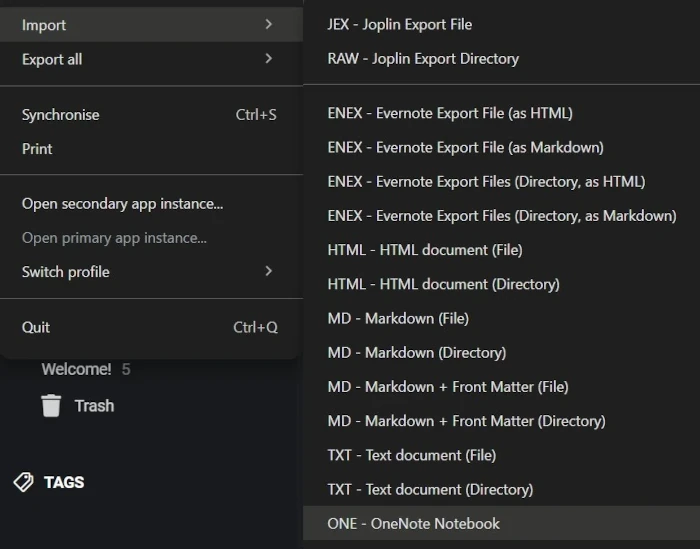
The scale on my side was modest - three notebooks: a university course notebook with a lot of typed text, screen captures and a handful of PDFs; a professional notebook of call logs and meeting minutes; and a Scouts notebook. No ink, no embedded Excel, no audio. I’d always treated OneNote warily - the proprietary format kept me away from doing anything I couldn’t easily get back out - and that paranoia turned out to be useful insurance now.
Joplin imports OneNote content as HTML and CSS, then runs an on-demand HTML-to-Markdown conversion step on top. That two-stage approach is more thoughtful than I expected: the rich-formatting bits - column layouts, dense visual arrangement, the sort of thing I used in OneNote to fit information on one screen without scrolling - survive the import in the HTML form, then get flattened when Joplin converts to Markdown. In theory you could keep notes in their HTML form, or hand-edit them to preserve column layouts as HTML tables. In practice, I don’t believe anybody who chose OneNote chose it because they wanted to write HTML - the whole appeal of OneNote is that it hides the markup. So Joplin’s import effectively forces a working-style change on you: density-via-layout doesn’t survive, and you either rebuild it by hand or you let it go. I let it go. Since switching to Markdown more broadly I’ve stopped reaching for column tricks anyway, and there’s something quietly freeing about not fighting a layout to make information fit.
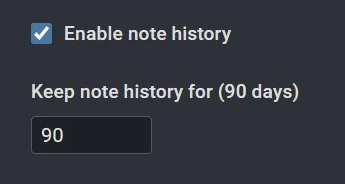
The most interesting losses are around embedded PDFs. OneNote stores an embedded PDF as a stack of page images plus a link to the file - effectively a screenshot stack. After import those page images come across looking broken in the Joplin note, with the working PDF link sitting alongside them. The fix isn’t to repair the broken images - it’s to delete them. Joplin has a real PDF renderer that displays the linked file inline in the note, the way a browser would, and it handles it more cleanly than OneNote’s screenshot-stack approach ever did. Once the note is cleaned up and contains just the PDF link, the broken image artefacts and the OneNote-generated page images become orphaned attachments - still sitting in Joplin’s resources folder, no longer referenced by any note. Joplin does an automatic orphan sweep once they fall outside the Note History retention window (mine’s 90 days), so you don’t have to chase them manually.
I’m doing this cleanup opportunistically rather than systematically - when I open a note for an actual reason, I tidy it before I leave. Even the Markdown conversion itself leaves notes in a not-quite-finished state: the title appears twice, the date and time end up on separate lines, small repetitive tidy-ups that add up.
How Joplin’s structure differs from OneNote
OneNote organises in three levels: notebook, section (the tabs across the top), and page. Joplin uses notebooks and notes, with notebooks nestable to whatever depth you want, plus a tag system that OneNote has nothing equivalent to. The migration map is roughly: OneNote notebook becomes a Joplin notebook, OneNote section becomes a sub-notebook, OneNote page becomes a note. What I found interesting is what Joplin lets you do once you’re not stuck inside the OneNote model.
Post-import, I rebuilt my structure rather than preserving what I’d had. The top-level notebook is organised using PARA (Projects, Areas, Resources, Archives), with tags layered on top to support cross-cutting retrieval. A separate notebook handles planning. Other notebooks not yet absorbed into the PARA structure sit under a misc parent. The migration is an opportunity most OneNote users miss: it’s a chance to start fresh with an organisation framework that’s actually been thought about, instead of carrying forward whatever ad-hoc shape your notebooks have grown into over the years. Joplin makes this kind of restructuring really easy; notebooks are just containers, notes can be moved or tagged freely - where OneNote’s section-tab metaphor quietly pushed back against it.
The to-do system is where Joplin pulled clearly ahead. OneNote does to-dos as inline annotations - checkboxes embedded in a page among other content - and the consequence is that lists end up scattered across pages with no good way to gather them. I never liked it. Joplin treats a to-do as a note with a checkbox on it, which sounds heavier and turns out to be lighter: each task gets a proper home with room for detail, completed items drop to the bottom of the list automatically, and reordering is a drag motion with the mouse.
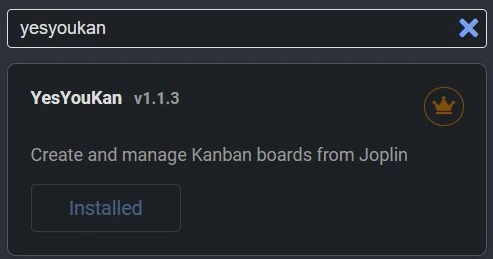
Joplin has a plugin ecosystem, which OneNote has no real answer to. YesYouKan turns a note into a working Kanban board just using markdown - same data, different view. The plugin search in Joplin’s options screen shows a small crown badge on plugins the Joplin team has reviewed and certified as good and safe. That detail matters more than it sounds: when you’ve gone to the trouble of leaving M365 for privacy reasons, a plugin system you can’t trust would put the whole privacy argument back in question.
Setting up Joplin to sync through Proton Drive
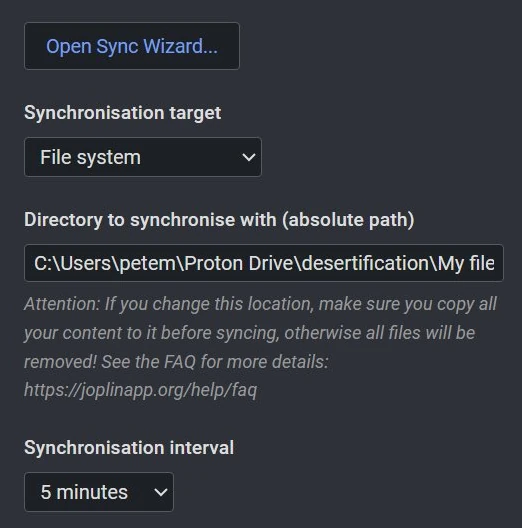
The sync mechanism on the Joplin side is deliberately simple. Joplin can write its database to a regular filesystem folder, and if Proton Drive’s Windows desktop client is keeping that folder synced to the cloud, the rest happens for free. My setup is exactly that: Joplin’s filesystem sync points at a folder called Joplin at the top of my Proton Drive, and the Drive client looks after pushing changes up. There’s no WebDAV server in the middle, no Joplin Server to maintain, no extra moving parts beyond what’s already running for files generally.
Joplin has its own optional end-to-end encryption layer that you can turn on inside the app, separate from anything Proton does. I haven’t enabled it. The data is already encrypted with my keys at the Proton layer, and the only scenario where a second encryption pass would help is one where someone has already got my Proton username, password and 2FA. At that point I’m already cooked, and my notebooks are the least of my problems.
Where this elegance breaks down is the platform gap. Joplin runs natively on Linux and I have a Linux box that wants in, but Joplin needs somewhere to sync to, and there’s no Proton Drive desktop client for Linux yet. The filesystem-sync trick that works on Windows can’t work on Linux. Mobile is the same shape: Joplin’s mobile apps sync only to a fixed list of destinations, and Proton Drive isn’t on it. The mobile gap doesn’t actually hurt me as I never used OneNote on a phone either, since serious note-taking needs a keyboard or a writeable surface - but the Linux gap is real.
The obvious workaround is rclone. My NAS is a Docker host with Tailscale already running across my devices, so the architecture would be reasonably tidy: a containerised rclone mount of Proton Drive on the NAS, exposing a WebDAV endpoint inside Tailscale only, with Linux-side and Mobile-side Joplin pointing at that endpoint. The Tailscale-only constraint is non-negotiable - exposing a WebDAV interface to all my Proton data on the public internet isn’t something I’m willing to do, and the moment you bridge end-to-end-encrypted storage out via WebDAV the privacy guarantee is whatever the WebDAV layer can offer. Even with that mitigation, I decided not to pursue this route.
The rclone backend for Proton Drive hasn’t been actively maintained in nearly three years, which alone would be reason enough not to bet a sync chain on it. The risk likelihood and impact increase when you look at what Joplin actually writes during a sync: a notebook of any size produces hundreds of small files - one per note, plus resources, plus sync metadata - and the integrity of the whole depends on all of them landing consistently. A silent partial failure, a CAPTCHA that doesn’t surface to the user (rclone has a known issue with not surfacing Proton’s anti-abuse challenges), an API endpoint Proton has deprecated but kept working out of goodwill - any of these could leave the database in a half-broken state. The actual story is more interesting than just “rclone is unmaintained”, and it’s what this whole migration is really about.
A Proton engineer posted publicly on the rclone forum in March 20261 explaining that Proton has a temporary goodwill exemption in place to keep rclone working past a 2024 data-integrity change, that they’ve submitted pull requests upstream to update rclone’s deprecated API endpoint and version header, that rclone’s polling-style API usage is generating disproportionate traffic against Proton’s servers, and that an upcoming storage-model change will make rclone unable to read newer files until the rclone backend is updated. The fix coming later in 2026 is Proton’s official Drive SDK - open source, free, and the path third-party tools will be expected to use.
That whole exchange is the reason the post you’re reading exists. Microsoft would not handle a deprecated third-party integration like this. The first you’d hear about it would be a Message Centre advisory, a broken script in production, or a forum full of people speculating about what changed. Proton’s engineer is in the rclone forum naming what’s exempted and why, what’s been submitted upstream, what’s coming next, and how long the goodwill lasts. I can read all of it, plan around it, and decide that “wait six months for the SDK and a native Linux client” is a better trade than stitching together rclone, WebDAV, Tailscale and a NAS to bridge a gap that’s about to be properly closed anyway. That’s not a privacy argument exactly - it’s the open-source-transparency argument the post was set up to deliver. The privacy is what made me move, and the transparency is what makes the waiting tolerable.
The reckoning
One thing I hadn’t expected to take away from this migration was a clearer understanding of how proprietary and sticky OneNote actually is. The export-only-to-.one, the lack of any “give me everything” command, the way the format encodes layout and embeds in shapes that can’t survive a translation to anything open - none of these were features I’d noticed while I was inside the system. They became visible the moment I tried to leave, and that visibility pushed me harder toward the door.
The migration was less work than the dread of it suggested. Three notebooks, Joplin’s native OneNote import, an evening of running the imports and a few hours of opportunistic cleanup as I opened notes for actual reasons. Nothing failed catastrophically, nothing was unrecoverable. The cleanup tax felt easy to shoulder knowing I could move between different open-sourced products from now on.
The interesting losses turned out to be opportunities. I expected to miss OneNote’s apparent richness with its columns, freeform canvas, and the way it let you put anything anywhere on a page. Instead, I discovered that most of it was overhead I worked around rather than benefited from. The information density I used to chase with column layouts is now achieved with the discipline of shorter notes, better structure and PARA on top. Joplin’s to-do system, which I’d assumed would be a downgrade from inline checkboxes, has turned out to be the opposite. The plugin ecosystem covers gaps OneNote couldn’t fill - kanban being the obvious example - with a transparent vetting process I can read for myself. It even replaces the Planner app (in Kanban view) that Proton doesn’t offer but M365 has deeply embedded. The platform gap on Linux is real but bounded, with a known fix arriving later this year via the official Proton Drive SDK.
The thing that made the timing of all this non-negotiable was Copilot. Microsoft has been steadily rolling Copilot into OneNote - and the rest of the M365 suite - as a default-on feature: switched on for everyone, with the user given the job of finding the toggle to turn it off, per app, per device. There’s an opt-out, technically. But the question of whether I wanted an AI assistant - server-side, processing my actual notes on Microsoft’s infrastructure - embedded in the place where I keep my actual thinking, was never asked. The decision was made for me, and the burden of objecting was placed on me.
Next was the introduction of actual Copilot Notebooks, which is a mashup of Loop shoved inside OneNote, creating more M365 admin woes and making that export almost impossible in future. That was the nail in the coffin.
The privacy argument was already strong enough on its own, and the transparency argument made waiting for the Linux gap to close feel like a reasonable trade rather than a sacrifice. The notebook I’m typing this in belongs only to me, and that’s the whole point.