Migrating Multiple M365 Mailboxes to Proton with One License
If you’ve arrived here from a search engine looking specifically for the shared-mailbox question, the short version is: yes, you can migrate two M365 mailboxes onto one Proton license, and you do it by temporarily moving the license between users in M365 rather than buying a second seat anywhere. The longer version assumes you’ve already done the basic Proton setup - both custom domains added and verified, MX records pointing at Proton, your primary mailbox already imported via Easy Switch. If any of that isn’t true, the previous post covers the standard single-mailbox flow first.
The setup I was starting from
My M365 tenant was lean: one licensed user mailbox on mahon.pro set up as a catch-all (so anything sent to *@mahon.pro landed there), plus a shared mailbox on petemahon.net for my personal domain. The shared mailbox had no license of its own - I accessed it by delegation from the licensed user account, which is the standard M365 pattern for shared mailboxes. There were a couple of other shared mailboxes for things I’d long since stopped caring about, so I omitted these from the migration.
mahon.pro is my work and professional address; petemahon.net is personal. I actively send from both, plus a handful of aliases on each. The catch-all on mahon.pro isn’t a hangover from setup - it’s deliberate. I hand out a uniquely generated address for every service I sign up to, all stored in my password manager, even when the address isn’t a login. With a catch-all in place, mail to any of those addresses still lands in my inbox, and the moment one of them starts attracting spam I know exactly which service leaked it. There were only a handful of addresses I would actively send from using an alias.
Why this isn’t obvious
If you read Proton’s marketing, the model looks straightforward: one person, one mailbox, one address. Easy Switch reinforces this; the import flow asks you to pick a single destination Proton address for each M365 source mailbox you’re pulling across. The unspoken assumption is that you arrive at Proton with one M365 mailbox and walk away with one Proton mailbox.
The reality of an M365 tenant, even a small one, rarely looks like that. You probably have at least one shared mailbox you actively use, possibly a second domain hanging off the same tenant, and a habit of sending mail from multiple addresses without thinking about it. Therefore, the obvious search-engine question is: do I need to buy two Proton licenses to migrate two M365 mailboxes?
No, but the answer comes with two pieces of context worth understanding upfront.
The first is that Proton has no equivalent of an M365 shared mailbox, and that absence is structural rather than a missing feature - a shared mailbox in the Proton model would require a shared private key, which breaks the end-to-end encryption that’s the whole point of being there. So if you’re moving a shared mailbox across, you’re not migrating a shared mailbox; you’re collapsing it into addresses on someone’s personal account.
The second is that Proton Unlimited supports up to three custom domains and effectively unlimited addresses on each - so the licensing question is whether you need separate accounts (you almost certainly don’t) rather than separate addresses (you can have as many as you like). I went with Unlimited; the three-domain ceiling was enough, and the included VPN with WireGuard support was the clincher.
The procedure, step by step
An M365 license isn’t bound to a mailbox - it’s bound to a user. You can move a single license between two users without losing the contents of either mailbox, provided you convert the unlicensed one to a shared mailbox first so it isn’t accidentally deleted when the license comes off.
Here’s what I did after migrating the mahon.pro mailbox:
Convert
mahon.proto a shared mailbox in the Exchange admin centre. Go to Recipients → Mailboxes, select the mailbox, and choose Convert to shared mailbox. A shared mailbox in Exchange Online retains its contents indefinitely without a license attached, so converting first means the mailbox can’t disappear when you take the license off in the next step. Do this before you touch the license, not after.Remove the license from
mahon.pro. With the mailbox now shared, removing the license leaves it dormant but intact. You have a 30-day grace window before Microsoft deletes data owned by unlicensed users - plenty for this whole procedure, but not so much that you should leave it sitting for weeks. Plan to finish within a few days.Assign the license to
petemahon.net. This is the user account that was, until a moment ago, sitting as a shared mailbox itself. Adding the license alone isn’t enough - Easy Switch will need to log in as this user - so you also need to reset the password and unblock sign-in in M365. Both are in the user’s properties pane in the admin centre.Make sure a
petemahon.netaddress is set up on Proton. If you followed the earlier posts in this series,petemahon.netwas already added as a second custom domain in Proton during the DNS setup. Ensure you have at least one email address set up in Proton for the second domain.Run Easy Switch against the now-licensed
petemahon.netaccount. Same flow as your first import: Settings → Easy Switch → Outlook, sign in as thepetemahon.netuser with the password you just reset. Pick a different label for this batch (I used the domain name) so you can tell at a glance which mail originated where in your Proton mailbox.Move the license back to
mahon.pro. Once the import finishes, reverse step 3: strip the license frompetemahon.net, re-licensemahon.pro. Themahon.promailbox comes back as a normal licensed mailbox with all contents intact from before the swap. You’ll need this license back onmahon.profor the OneDrive and SharePoint migrations covered later in the series, so don’t skip this step thinking you’re done.
The whole sequence took me an evening. The 30-day clock starts ticking the moment you remove a license from a user account, so don’t space these steps out across weeks - finish within a few days at most.
What ends up where
After both imports finish, you have a single merged Proton inbox. Mail from mahon.pro and mail from petemahon.net arrive in the same stream, sorted chronologically, but each message carries the import label you assigned, so the two batches stay visibly distinct at a glance.
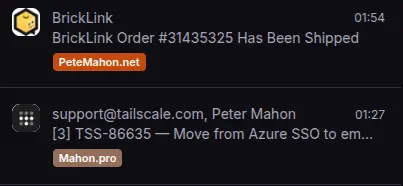
The original To and From addresses on every imported message are preserved exactly as they were in M365. A mail that was sent to bills@petemahon.net still shows as having been addressed to bills@petemahon.net - Proton doesn’t rewrite the headers to point at your primary address. Search, threading, and any “where did this come from” forensics all behave naturally. The labels are the visible marker; the underlying address data is intact.
Proton’s filters can label incoming mail automatically based on the recipient address or domain, so you can set a filter that says “any mail addressed to *@petemahon.net gets the PeteMahon.net label” and the two domains stay partitioned indefinitely, not just for the historical batch. Setup details are in the previous post - worth doing once and forgetting about.
Sending and replying
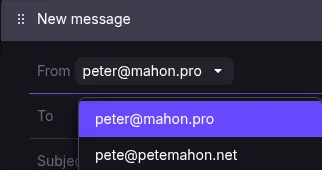
The compose window has a From dropdown listing every address available to you - both domains, every address you’ve set up on each, and aliases. Pick the one you want to send from. For replies, Proton automatically replies as the address the mail was originally addressed to, provided that address exists on your account; if it doesn’t, you’ll fall back to your primary. This is the same behaviour M365 offered, so if you’re coming from a multi-address Outlook setup, nothing about your daily flow changes.
Catch-all on both domains
Both my domains have catch-all enabled in Proton - mahon.pro routing to peter@mahon.pro and petemahon.net routing to pete@petemahon.net. This is set per-domain under Settings → Domain names → (your domain) → Catch-all, and the per-domain target is what makes the labelling-by-filter approach work cleanly: each catch-all delivers to a known address on its own domain, so the filter-on-recipient-domain rule catches everything regardless of what the original sender used.
The data-leak-detection benefit I had on mahon.pro in M365 - handing out unique addresses per service so I can see which one starts attracting spam - carries straight across. Same pattern, same visibility, no behavioural change.
Limitations vs a full multi-user Proton setup
Honest assessment of what you give up by collapsing two M365 mailboxes onto one Proton license, written from a few weeks in:
Storage isn’t the issue I expected it to be. Years of mail across both domains, plus a chunk of historical files, came in at around 50GB. The Unlimited plan ceiling is 500GB. If you’ve been disciplined about purging promotional mail and newsletters, and other non person-to-person communications before migration - which you should be doing anyway - you’re nowhere near the wall. If you’ve kept every Groupon receipt and PDF utility statement since 2014, you’ll find out faster.
No separate logins, but only if you actually wanted them. Both domains live behind a single Proton account, which means there’s no second identity to hand to a family member or colleague who needs to read mail on one of the addresses. For me this was a non-issue - I never delegated mailbox access in M365 either, and if a family member needed an address they’d have got their own license. If you genuinely share mailbox access today (a partner reading bills@yourdomain from their own login, for instance), the Proton model doesn’t accommodate that. Worth knowing that this isn’t a one-way door, though: Proton Duo and the Business plans both let you add users without re-doing any of the migration work above, so if your situation evolves - kids old enough to want their own address, a partner who’d benefit from one on the family domain - you’re upgrading rather than starting over. It’s something I’m thinking about for my own household, particularly for the kids; their own domain-backed identity feels like a useful starting point for a privacy-aware life online.
Auto-replies are account-level, not address-level. If you set “out of office” for one address, it goes out for all of them. I’ve never used auto-replies on personal addresses, so this didn’t come up; if your bills@ address is something you want to silently absorb mail while your pete@ address tells people you’re on holiday, you can’t do that on a single account.
Recovery deserves more thought than the M365 comparison suggests. It’s tempting to frame “two M365 accounts vs one Proton account” as halving your recovery surface, but that’s the wrong frame. Both platforms operate under a Shared Responsibility Model: the provider keeps the service running, you keep your access credentials and your data backups. The number of accounts in play doesn’t change that - what matters is whether you’ve set up Proton’s recovery options properly (recovery phrase, recovery email, recovery file for encrypted data) and whether you have an export strategy for the mail itself. Proton’s personal tier plans don’t include the concept of an admin account that could rescue a primary user; the Business plans do, but they’re separately licensed. Worth knowing if it shapes your plan choice.
Beyond those four, nothing in daily use felt like a compromise. Send-as works the way it did in M365, catch-all carries the data-leak-detection pattern across, filters keep the two domains visually partitioned, and the merged inbox turned out to be easier to search than two separate ones ever were. For a single user running multiple personal domains, the one-license model holds up.
Next steps
The next post tackles the OneDrive-to-Proton-Drive migration - by which point your M365 license is back on its original mailbox, ready for the file move.